
Digital Negative Plugin for Photoshop
Craft better digital negatives, faster.
NegCraft is a Photoshop plugin that streamlines digital-negative preparation for cyanotype, salt printing, platinum/palladium, and other alternative photographic processes. Includes an in-plugin Quick Start Guide and a comprehensive illustrated 52-page User Guide. Spend less time clicking, more time printing.
NegCraft 1.1 — $99 USD — taxes calculated at checkout where applicable
NegCraft is a Photoshop plugin built specifically for digital negatives. Automate your workflow, and output professional-quality negatives for alternative processes.
Professional Digital Negatives for Historic Photographic Processes—directly inside Adobe Photoshop.
NegCraft streamlines the process of producing digital negatives by combining intuitive controls with a flexible, non-destructive Smart Object workflow. Whether you're making cyanotypes, platinum/palladium prints, salted paper prints, gum bichromates, or other historical photographic processes, NegCraft helps you prepare accurate, repeatable negatives without disrupting your existing Photoshop workflow.
Unlike traditional actions or destructive adjustments, NegCraft keeps your original image intact while allowing you to experiment with tonal adjustments, process-specific curves, and print-ready output—all from a single interface. Includes an in-plugin Quick Start Guide and a comprehensive illustrated 52-page User Guide.
Current version v1.1
Features
Non-destructive Smart Object workflow
Process-specific negative preparation
Built-in support for multiple alternative photographic processes
Interactive Black & White channel mixing
Flexible channel output options
Automatic negative rendering
Real-time Original/Negative preview
User preset support
Professional Quick Start Guide included
Current Process Support
Cyanotype
Platinum/Palladium
Van Dyke Brown
Salted Paper
Silver Gelatin
Albumen
Gum Bichromate
Gum Oil
Photopolymer Gravure
Custom User Curves
Requirements
Adobe Photoshop 2024 (version 25.2) or later
UXP-compatible version of Photoshop
Inkjet printer suitable for printing digital negatives
Included
NegCraft Photoshop Plugin
Quick Start Guide: included inside the plugin
52-page User Guide: included with the ZIP download
Future updates to NegCraft 1.x
Your NegCraft activation code will be delivered by email, typically within a few hours during business hours, Monday–Friday, Central Time (US). Orders placed outside business hours may be processed the following business day. Please check your spam or junk folder if the email does not appear.
By purchasing, downloading, installing, or using NegCraft, you agree to the NegCraft End User License Agreement.
What NegCraft Does
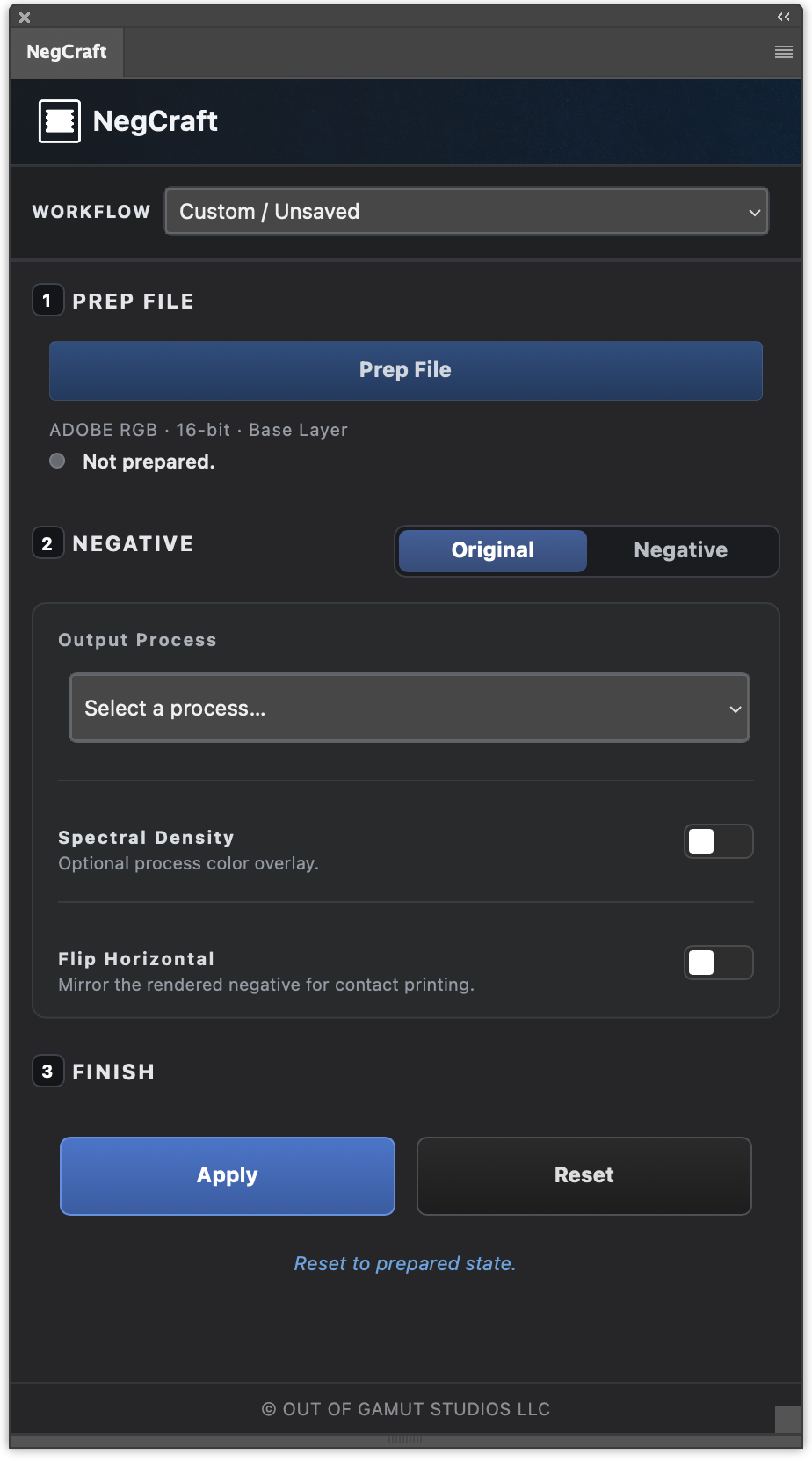
NegCraft brings the essential steps of digital-negative preparation into one organized Photoshop workflow. Prepare your image non-destructively, apply a process-specific preset or custom curve, preview the result, and generate a repeatable negative ready for printing.
Preserve your original image inside a protected Smart Object
Choose from presets developed for alternative photographic processes
Load your own custom calibration curves
Preview the original and rendered negative
Save and share reusable workflows
Apply spectral-density controls and horizontal flipping when needed
A Simple, Repeatable Workflow
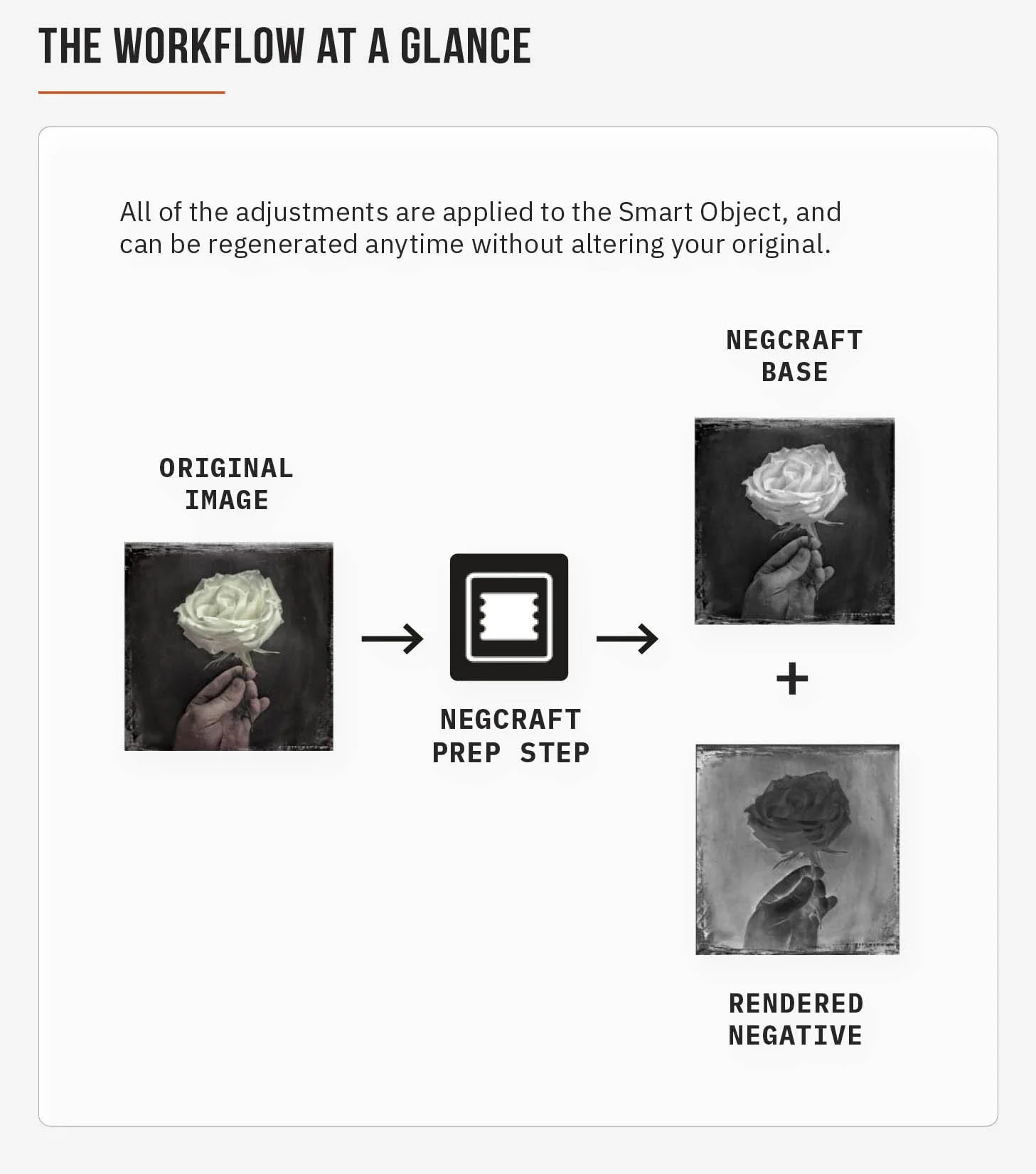
NegCraft keeps digital-negative preparation organized without changing the way you work in Photoshop.
1. Prepare
Prepare your image inside a protected Smart Object while preserving the original photograph.
2. Choose
Select a process-specific preset or load your own custom calibration curve.
3. Render
Preview your settings and generate a repeatable digital negative for printing.
4. Print and Refine
Print onto inkjet transparency film, expose your process, evaluate the result, and refine the workflow as needed.
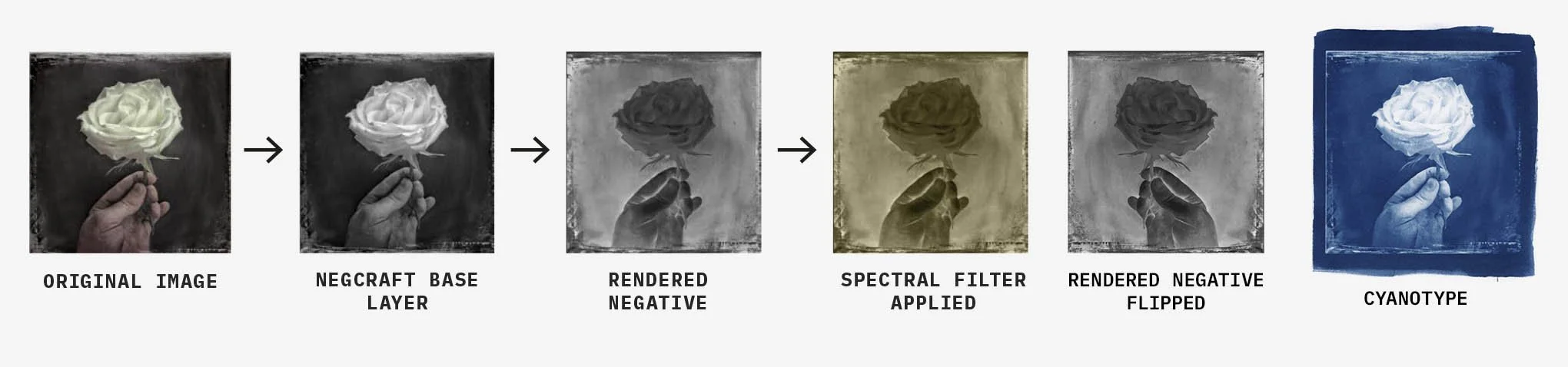
From Image to Printable Negative
Original image → prepared base → rendered negative → optional spectral-density filter → horizontally flipped output
Built for Alternative-Process Makers
Whether you are building a repeatable studio workflow, preparing negatives for the classroom, or making your first alternative-process print, NegCraft keeps the technical preparation organized inside Photoshop—so you can spend more time making prints.
Alternative-process photographers
Artists combining digital and analog methods
Educators teaching hybrid photographic workflows
Students learning digital-negative preparation
What’s Included
Your NegCraft purchase includes:
NegCraft 1.1 Photoshop plugin installer
Illustrated 52-page NegCraft User Guide
In-plugin Quick Start Guide for offline reference
NegCraft Installation Guide
Built-in process presets and custom-curve support
Reusable workflow saving, importing, and exporting
License activation code delivered by email
Access to software updates for your licensed version
Installation, activation, and technical support
NegCraft is licensed to one user. Installation and activation limits are governed by the license terms presented at purchase. Digital product. No physical item will be shipped. Adobe Photoshop is required and is not included. Your NegCraft activation code will be delivered by email, typically within a few hours during business hours, Monday–Friday, Central Time (US). Orders placed outside business hours may be processed the following business day. Please check your spam or junk folder if the email does not appear.
NegCraft is a Photoshop plugin built specifically for digital negatives. Automate your workflow, and output professional-quality negatives for alternative processes.
Professional Digital Negatives for Historic Photographic Processes—directly inside Adobe Photoshop.
NegCraft streamlines the process of producing digital negatives by combining intuitive controls with a flexible, non-destructive Smart Object workflow. Whether you're making cyanotypes, platinum/palladium prints, salted paper prints, gum bichromates, or other historical photographic processes, NegCraft helps you prepare accurate, repeatable negatives without disrupting your existing Photoshop workflow.
Unlike traditional actions or destructive adjustments, NegCraft keeps your original image intact while allowing you to experiment with tonal adjustments, process-specific curves, and print-ready output—all from a single interface. Includes an in-plugin Quick Start Guide and a comprehensive illustrated 52-page User Guide.
Current version v1.1
Features
Non-destructive Smart Object workflow
Process-specific negative preparation
Built-in support for multiple alternative photographic processes
Interactive Black & White channel mixing
Flexible channel output options
Automatic negative rendering
Real-time Original/Negative preview
User preset support
Professional Quick Start Guide included
Current Process Support
Cyanotype
Platinum/Palladium
Van Dyke Brown
Salted Paper
Silver Gelatin
Albumen
Gum Bichromate
Gum Oil
Photopolymer Gravure
Custom User Curves
Requirements
Adobe Photoshop 2024 (version 25.2) or later
UXP-compatible version of Photoshop
Inkjet printer suitable for printing digital negatives
Included
NegCraft Photoshop Plugin
Quick Start Guide: included inside the plugin
52-page User Guide: included with the ZIP download
Future updates to NegCraft 1.x
Your NegCraft activation code will be delivered by email, typically within a few hours during business hours, Monday–Friday, Central Time (US). Orders placed outside business hours may be processed the following business day. Please check your spam or junk folder if the email does not appear.
By purchasing, downloading, installing, or using NegCraft, you agree to the NegCraft End User License Agreement.
System Requirements
Adobe Photoshop 2024 (version 25.2) or later
Adobe Creative Cloud desktop app
macOS with Apple Silicon or Intel processor, or Windows 10/11
Internet connection for license activation and software-update checks
Compatible inkjet printer and inkjet transparency film for printing physical negatives
NegCraft operates inside Adobe Photoshop. After activation, the plugin can be used offline; an internet connection is required for activation and online services such as checking for updates.